News & Updates
Export Declaration Guide Ireland
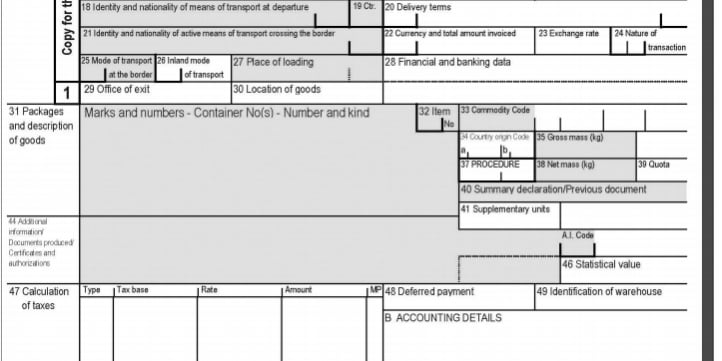
This Export Declaration Guide Ireland is a guide to completing an SAD declaration form on Custran. Here you will find general information and a Step By Step guide.
Introduction
This Export Declaration Guide Ireland is a guide to completing an SAD declaration form on Custran. Here you will find general information and a Step By Step guide to filling in the boxes required in the export SAD. The information is primarily taken from Revenues AEP Trader Guides available here:
The SAD is used for Full Declarations for Frontier Clearance (Full Statistical and Accounting Declaration) with the data declared on the SAD form input to customs.
The differing usages of SAD are covered by specific sections in this document.
Export Declaration Guide Ireland – Step By Step Guide
The information in this document is a guide only. Custran does not provide professional advice, including legal advice. It should not be assumed that the guidance is comprehensive or that it provides a definitive answer in every case.
The data in this document provides a guide to the operation of the declaration transactions – insert, amend and display.
This guide describes the data validation which takes place on the input you provide but you may need to refer to the Tariff for the correct codes to be used for the completion of declarations.
Other tasks that you may also need to perform, such as the retrieval of Reference Data, are covered in other User Guides.
A declaration may be:
- Input by a Trader or by Customs Agent on their behalf;
- Pre-lodged or with the goods on-hand;
- Stored (errored) or accepted.
- A This is for alpha characters (letters) only. You may not include numbers in this field.
- AN This is alphanumeric, these fields may include numbers in addition to alpha characters.
- N This is for numeric characters only. You may not include alpha characters in these fields.
Data inserted by you can be listed and cancelled by you. Legally Accepted, Direct Trader Input (DTI) Declarations may only be cancelled by Customs. (The term ‘accepted’ covers an Entry that has been input to the system without errors either as a Pre-lodged Entry if the goods are not on hand, or as a Legally Accepted Entry if the goods are on hand.)
You may only amend data that is owned by you, in accordance with the data privacy features of the system, and may only view your own declarations.
Declarations Using SAD Structure
Single Administrative Document (SAD) Declaration Types
The SAD document supports a number of different types of declarations covering up to 99 Items.
The SAD is used for Full Declarations for Frontier Clearance (Full Statistical and Accounting Declaration) with the data declared on the SAD form sent to customs.
Consignments in a Customs Warehouse can also be removed under normal procedures. The differing usages of SAD are covered by specific sections in this document.
Step By Step Box Number Guide
Formats
- A This is for alpha characters (letters) only. You may not include numbers in this field.
- AN This is alphanumeric, these fields may include numbers in addition to alpha characters.
- N This is for numeric characters only. You may not include alpha characters in these fields.
- See Appendix 1b for the list of codes.
- The s
No dot between the format and the number indicate the amount of characters that must be included. Example A2 means that two alpha characters must be entered.
Two dots between the format and the number indicate “up to”, the maximum number of characters that may be included. Example AN..35, means that alphanumeric characters may be
entered, the maximum that can be entered is 35, but less may be entered.
Box A: OFFICE OF EXPORT
Status: Mandatory. Format: AN8
Enter the customs office code. The first subdivision (customs office of import country code) is IE.
The second subdivision (customs office of or Export code) is validated through using IE as the country code of the customs office, example DUB.
The third subdivision (customs office of import or export code national subdivision) is validated through using IE as the country code and the customs office code in the first subdivision, example “IE” and “DUB” with “000” as national subdivision.
- See Appendix 1b for the list of codes.
- The specific circumstance indicator can only be “A”, “B”, “E” or empty.
- If the specific circumstance indicator is “E” (AEO), the declarant or representative,
- For export customs declarations, if box 1.1 contains “CO” or box 17a country of destination
- See Appendix 29 for the list of codes.
- The transport charges – method of payment is disabled when specific circumstance indicator is “E” (AEO). Otherwise, it is optional..
- For export customs declarations, if box 1.1 contains “CO” or box 17a country of destination contains CH or NO or LI, box A transport charges – method of payment is disabled.
- See Appendix 27 for the list of codes.
- Enter the number of seals attached.
- If Box 1.1 contains “ES” and 1.2 – 2nd subdivis
Box A: SPECIFIC CIRCUMSTANCES INDICATOR
Status: Conditional. Format: A1
- The specific circumstance indicator can only be “A”, “B”, “E” or empty.
- If the specific circumstance indicator is “E” (AEO), the declarant or representative,
- For export customs declarations, if box 1.1 contains “CO” or box 17a country of destination
- See Appendix 29 for the list of codes.
- The transport charges – method of payment is disabled when specific circumstance indicator is “E” (AEO). Otherwise, it is optional..
- For export customs declarations, if box 1.1 contains “CO” or box 17a country of destination contains CH or NO or LI, box A transport charges – method of payment is disabled.
- See Appendix 27 for the list of codes.
- Enter the number of seals attached.
- If Box 1.1 contains “ES” and 1.2 – 2nd subdivision is “P” this box is not required.
- Enter the seal identification.
- Enter the appropriate
consignor or exporter must have a valid EORI trader number
- For export customs declarations, if box 1.1 contains “CO” or box 17a country of destination
- See Appendix 29 for the list of codes.
- The transport charges – method of payment is disabled when specific circumstance indicator is “E” (AEO). Otherwise, it is optional..
- For export customs declarations, if box 1.1 contains “CO” or box 17a country of destination contains CH or NO or LI, box A transport charges – method of payment is disabled.
- See Appendix 27 for the list of codes.
- Enter the number of seals attached.
- If Box 1.1 contains “ES” and 1.2 – 2nd subdivision is “P” this box is not required.
- Enter the seal identification.
- Enter the appropriate code (EX, CO or EU or ES) to indicate the type of exportation
- See related business rules of boxes 15a and 17a.
- [See Appendix 2 for the list of codes.](https://www.revenue.ie/en/customs-traders-and-agents/documents/ele
contains CH or NO or LI, box A: specific circumstance indicator is disabled.
- See Appendix 29 for the list of codes.
- The transport charges – method of payment is disabled when specific circumstance indicator is “E” (AEO). Otherwise, it is optional..
- For export customs declarations, if box 1.1 contains “CO” or box 17a country of destination contains CH or NO or LI, box A transport charges – method of payment is disabled.
- See Appendix 27 for the list of codes.
- Enter the number of seals attached.
- If Box 1.1 contains “ES” and 1.2 – 2nd subdivision is “P” this box is not required.
- Enter the seal identification.
- Enter the appropriate code (EX, CO or EU or ES) to indicate the type of exportation
- See related business rules of boxes 15a and 17a.
- See Appendix 2 for the list of codes.
- Enter A, B, C, X, Y, Z, N or P as appropriate.
- Note:
Box A: TRANSPORT CHARGES – METHOD OF PAYMENT
Status: Conditional. Format: A1
- The specific circumstance indicator can only be “A”, “B”, “E” or empty.
- If the specific circumstance indicator is “E” (AEO), the declarant or representative,
- For export customs declarations, if box 1.1 contains “CO” or box 17a country of destination
- See Appendix 29 for the list of codes.
- The transport charges – method of payment is disabled when specific circumstance indicator is “E” (AEO). Otherwise, it is optional..
- For export customs declarations, if box 1.1 contains “CO” or box 17a country of destination contains CH or NO or LI, box A transport charges – method of payment is disabled.
- See Appendix 27 for the list of codes.
- Enter the number of seals attached.
- If Box 1.1 contains “ES” and 1.2 – 2nd subdivision is “P” this box is not required.
- Enter the seal identification.
- Enter the appropriate
Box D: SEALS – NUMBER
Status: Conditional. Format: N..4
- Enter the number of seals attached.
- If Box 1.1 contains “ES” and 1.2 – 2nd subdivision is “P” this box is not required.
- Enter the seal identification.
- Enter the appropriate code (EX, CO or EU or ES) to indicate the type of exportation
- See related business rules of boxes 15a and 17a.
- See Appendix 2 for the list of codes.
- Enter A, B, C, X, Y, Z, N or P as appropriate.
- Note: Use of any of the following codes B, C, X, Y or Z requires prior authorisation.
- When CD CAP export is ‘true’, then selected code can only be for a complete declaration.
- See Appendix 3 for the list of codes.
- CAE followed by the Customs and Excise regist
Box D: SEALS – IDENTITY
Status: Conditional. Format: AN..20
- Enter the seal identification.
- Enter the appropriate code (EX, CO or EU or ES) to indicate the type of exportation
- See related business rules of boxes 15a and 17a.
- See Appendix 2 for the list of codes.
- Enter A, B, C, X, Y, Z, N or P as appropriate.
- Note: Use of any of the following codes B, C, X, Y or Z requires prior authorisation.
- When CD CAP export is ‘true’, then selected code can only be for a complete declaration.
- See Appendix 3 for the list of codes.
- CAE followed by the Customs and Excise registration number
- CGT followed by the Capital Gains Tax registration number
- ITX followed by the Income Tax registration number
- PYE followed by the Pay As You Earn registration number
- Entering
Box 1.1: EXPORTATION CODE
Status: Mandatory. Format: A2
- Enter the appropriate code (EX, CO or EU or ES) to indicate the type of exportation
- See related business rules of boxes 15a and 17a.
- See Appendix 2 for the list of codes.
- Enter A, B, C, X, Y, Z, N or P as appropriate.
- Note: Use of any of the following codes B, C, X, Y or Z requires prior authorisation.
- When CD CAP export is ‘true’, then selected code can only be for a complete declaration.
- See Appendix 3 for the list of codes.
- CAE followed by the Customs and Excise registration number
- CGT followed by the Capital Gains Tax registration number
- ITX followed by the Income Tax registration number
- PYE followed by the Pay As You Earn registration number
- Entering a VAT number will result in the transaction being rejected.
Box 1.2: DECLARATION TYPE CODE
Status: Mandatory. Format: A1
- Enter A, B, C, X, Y, Z, N or P as appropriate.
- Note: Use of any of the following codes B, C, X, Y or Z requires prior authorisation.
- When CD CAP export is ‘true’, then selected code can only be for a complete declaration.
- See Appendix 3 for the list of codes.
- CAE followed by the Customs and Excise registration number
- CGT followed by the Capital Gains Tax registration number
- ITX followed by the Income Tax registration number
- PYE followed by the Pay As You Earn registration number
- Entering a VAT number will result in the transaction being rejected.
- [You will find information about this in EORI Registration guide.](http://www.revenue.ie/en/customs-traders-and-agents/documents/electronic/ereg
Box 2.1: CONSIGNOR/EXPORTER
Status: Mandatory. Format: AN..17
If the exporter has an EORI number this must be used. If the exporter does not have an EORI but
has any other Revenue number (see below) other than a VAT number, this Revenue number must
be used. If the exporter does not have a Revenue number enter NR (not registered) and see Box 2.2 below.
The accepted Revenue numbers are:
- CAE followed by the Customs and Excise registration number
- CGT followed by the Capital Gains Tax registration number
- ITX followed by the Income Tax registration number
- PYE followed by the Pay As You Earn registration number
- Entering a VAT number will result in the transaction being rejected.
- You will find information about this in EORI Registration guide.
- Name AN..35 (free text) Mandatory [Minimum 4 characters]
- Address Line 1 AN..35 Mandatory [Minimum 8 characters]
- Address Line 2 AN..35 Mandatory [between A1 & A2]
- Post Code AN..9 Mandatory
- Country Code A2 Mandatory
- See Appendix 4 for the list of codes.
If you do not hold a C&E or EORI registration and intend to export goods from Ireland, the
registration process must be completed on line. A facility is available on ROS to allow traders (or
their tax agents on their behalf) to register for C&E and EORI.
- You will find information about this in EORI Registration guide.
- Name AN..35 (free text) Mandatory [Minimum 4 characters]
- Address Line 1 AN..35 Mandatory [Minimum 8 characters]
- Address Line 2 AN..35 Mandatory [between A1 & A2]
- Post Code AN..9 Mandatory
- Country Code A2 Mandatory
- See Appendix 4 for the list of codes.
- 1 digit = fiscal (calendar) year, selection in a list (0 to 9)
- 2 digit = country code of the seller, selection in a list
- 32 characters left for company identifier + company reference. Other references can be en
Box 2.2: CONSIGNOR/EXPORTER
Status: Conditional
If box 2.1 contains NR enter the consignor’s/exporter’s name and address in the following format.
- Name AN..35 (free text) Mandatory [Minimum 4 characters]
- Address Line 1 AN..35 Mandatory [Minimum 8 characters]
- Address Line 2 AN..35 Mandatory [between A1 & A2]
- Post Code AN..9 Mandatory
- Country Code A2 Mandatory
- See Appendix 4 for the list of codes.
- 1 digit = fiscal (calendar) year, selection in a list (0 to 9)
- 2 digit = country code of the seller, selection in a list
- 32 characters left for company identifier + company reference. Other references can be entered
Box 5: ITEMS
Status: Conditional. Format: N3
Enter the total number of items covered by the customs declaration.
The number of items must equal the number of completed boxes 31 on the customs declaration.
The maximum number of items that you can enter on a customs declaration is 99.
If Box 1.1 contains “ES” and 1.2 – 2nd subdivision is “P” this box is not required.
Box 7: REFERENCE NUMBER
Status: Optional. Format: AN..35
The Reference Number can be used to enter data according to WCO recommendation on UCR dated 30/06/2001 as follows:
- 1 digit = fiscal (calendar) year, selection in a list (0 to 9)
- 2 digit = country code of the seller, selection in a list
- 32 characters left for company identifier + company reference. Other references can be entered
- CAE followed by the Customs and Excise registration number
- CGT followed by the Capital Gains Tax registration number
- ITX followed by the Income Tax registration number
- PYE followed by the Pay As You Earn registration number
- Entering a VAT number will result in the transaction being rejected.
- You will find information about this in EORI Registration guide.
in this box.
If Box 1.1 contains “ES” and 1.2 – 2nd subdivision is “P” this box is not required.
Box 8.1: CONSIGNEE
Status: Mandatory. Format: AN..17
If the consignee has an EORI number, this must be used. If the consignee does not have an EORI
but has any other Revenue number (see below) other than a VAT number this Revenue number must be used.
If the consignee does not have an EORI or Revenue number enter NR and see box 8.2 below.
The accepted Revenue numbers are:
- CAE followed by the Customs and Excise registration number
- CGT followed by the Capital Gains Tax registration number
- ITX followed by the Income Tax registration number
- PYE followed by the Pay As You Earn registration number
- Entering a VAT number will result in the transaction being rejected.
- You will find information about this in EORI Registration guide.
- Name AN..35 (free text) Mandatory [Minimum 4 characters]
- Address Line 1 AN..35 Mandatory [Minimum 8 characters]
- Address Line 2 AN..35 Mandatory [between A1 & A2]
- Post Code AN..9 Mandatory
- Country Code A2 Mandatory
- See Appendix 4 for the list of codes.
If you do not hold a C&E or EORI registration and intend to export goods from Ireland, the
registration process must be completed on line. A facility is available on ROS to allow traders (or
their tax agents on their behalf) to register for C&E and EORI.
- You will find information about this in EORI Registration guide.
- Name AN..35 (free text) Mandatory [Minimum 4 characters]
- Address Line 1 AN..35 Mandatory [Minimum 8 characters]
- Address Line 2 AN..35 Mandatory [between A1 & A2]
- Post Code AN..9 Mandatory
- Country Code A2 Mandatory
- See Appendix 4 for the list of codes.
- 1 digit = fiscal (calendar) year, selection in a list (0 to 9)
- 2 digit = country code of the seller, selection in a list
- 32 characters left for company identifier + company reference. Other references can be en
Box 8.2: CONSIGNEE
Status: Conditional
If box 8.1 contains NR enter the consignee’s name and address in the format identified:
- Name AN..35 (free text) Mandatory [Minimum 4 characters]
- Address Line 1 AN..35 Mandatory [Minimum 8 characters]
- Address Line 2 AN..35 Mandatory [between A1 & A2]
- Post Code AN..9 Mandatory (Postcode if available, otherwise insert NONE)
- Country Code A2 Mandatory
- See Appendix 4 for the list of country codes.
- See Appendix 6 for the list of country codes.
- See Appendix 4 for the list of country codes.
Box 14.1: STATUS OF THE DECLARANT/REPRESENTATIVE
Status: Mandatory. Format: N1
Enter the appropriate code to indicate the status of the declarant/representative.
If the status of the representative (box 14a) is not 1 (“Representative” case), box 8
(“consignee”) must be different from the value of box 14.
- See Appendix 6 for the list of country codes.
- See Appendix 4 for the list of country codes.
- If box 1.1 contains declaration type “CO” then box 17a destination code must contain a country
- If box 1.1 contains declaration type “EU” then box 17a destination code must contain a country
- If box 1.1 contains declaration type “EX” then box 17a destination code cannot contain a
- [See Appendix 4 for the list of country codes.](https://www.revenue.ie/en/customs-traders-and-age
Box 14.2: REPRESENTATIVE EORI NUMBER
Status: Mandatory. Format: AN..17
The only acceptable number is the EORI number.
Box 15a: COUNTRY OF DISPATCH/EXPORT CODE
Status: Conditional. Format: A2
Enter the country code for the country from which the goods were initially dispatched. Must
be a member of the European Union.
If Box 1.1 contains declaration type “ES” this box is not required.
- See Appendix 4 for the list of country codes.
- If box 1.1 contains declaration type “CO” then box 17a destination code must contain a country
- If box 1.1 contains declaration type “EU” then box 17a destination code must contain a country
- If box 1.1 contains declaration type “EX” then box 17a destination code cannot contain a
- See Appendix 4 for the list of country codes.
Box 17a: COUNTRY OF DESTINATION
Status: Conditional. Format: A2
Enter the country code for the country of final destination of the goods
- If box 1.1 contains declaration type “CO” then box 17a destination code must contain a country
- If box 1.1 contains declaration type “EU” then box 17a destination code must contain a country
- If box 1.1 contains declaration type “EX” then box 17a destination code cannot contain a
- See Appendix 4 for the list of country codes.
- Sea:
code from the European Union (EU).
- If box 1.1 contains declaration type “EU” then box 17a destination code must contain a country
- If box 1.1 contains declaration type “EX” then box 17a destination code cannot contain a
- See Appendix 4 for the list of country codes.
- Sea:
from the European Free Trade Association (EFTA).
- If box 1.1 contains declaration type “EX” then box 17a destination code cannot contain a
- See Appendix 4 for the list of country codes.
- Sea:
country from the EU or from the European Free Trade Association (EFTA).
If Box 1.1 contains declaration type “ES” this box is not required.
- See Appendix 4 for the list of country codes.
- If box 1.1 contains declaration type “CO” then box 17a destination code must contain a country
- If box 1.1 contains declaration type “EU” then box 17a destination code must contain a country
- If box 1.1 contains declaration type “EX” then box 17a destination code cannot contain a
- See Appendix 4 for the list of country codes.
Box 18: IDENTITY AND NATIONALITY OF MEANS OF TRANSPORT AT DEPARTURE
Status: Conditional. Format: AN..27
Enter the identity of the means of transport on which the goods are directly loaded at the time of
presentation at the customs office where the destination formalities are completed.
If Box 1.1 contains declaration type “ES” this box is not required.
When requested procedure EU type is B or D (warehousing) OR When Mode of transport is “5” (postal) or “7” (fixed installations)
THEN No entry in this field will be permitted.
In all other circumstances completion of this box is mandatory.
Enter the identity of the means of transport on departure as follows:
- Sea:
- Air:
- Road:
- Rail:
- [See Appendix 9 for the list of codes.]
If the mode of transport (box 26 if completed, otherwise box 25) is “1” (Sea), then data must
consist of either:
o International Maritime Organisation (IMO) ship identification number
(format N7 – leading ‘0’ allowed)
o European Vessel Identification Number (ENI) (format N8 – must lead with the number
‘9’)
Note: both of these will need to satisfy the ships identification number algorithm.
If mode of transport (box 26 if recorded, otherwise box 25) is “4” (Air), then the data
consists of the flight number and has format AN.8 where:
o AN..3 mandatory prefix identifying the airlines/operator N..4 mandatory number of the flight
o A1 optional suffix.
If the mode of transport (box 26 if completed, otherwise box 25) is “3” (Road), then the data
consists of the vehicle registration number – if a tractor and trailer with different registration
numbers are used, enter the registration number of both the tractor and trailer.
If mode of transport (box 26 if completed, otherwise box 25) is “2” (Rail), then the data
consists of the wagon number.
Box 20.1: DELIVERY CODE
Status: Conditional. Format: A3
Enter the appropriate Incoterm Code.
For an export customs declaration, if the requested procedure EU type is ‘B’ or the previous
procedure EU type is “J” or “K”, box 20 delivery terms is disabled.
If Box 1.1 contains declaration type “ES” this box is not required.
Box 20.2: DELIVERY DESTINATION
Status: Conditional – required if 20/1 is completed. Format: AN..35
Enter the place specified in the delivery terms.
If Box 1.1 contains declaration type “ES” this box is not required.
Box 20.3: DELIVERY LOCATION
Status: Optional. Format: N1
Enter the code for the delivery destination location.
If Box 1.1 contains declaration type “ES” this box is not required.
Box 21.1: IDENTITY OF ACTIVE MEANS OF TRANSPORT CROSSING THE BORDER
Status: Conditional. Format: AN..35
Insert the name of the vessel and date of the flight/vehicle registration number/wagon number.
Mandatory for export of agricultural products attracting export refunds.
If Box 1.1 contains declaration type “ES” this box is not required.
Box 21.2: NATIONALITY OF ACTIVE MEANS OF TRANSPORT CROSSING THE BORDER
Status: Optional. Format: A2
Enter the country code for the nationality of active means of transport crossing the border. If the
mode of transport at the border = 2, 5 or 7 box 21.2 is optional, otherwise it is mandatory.
If Box 1.1 contains declaration type “ES” this box is not required.
Box 22.1: CURRENCY CODE
Status: Conditional. Format: A3
Enter the appropriate currency code.
If Box 1.1 contains declaration type “ES” this box is not required.
Box 22.2: TOTAL AMOUNT INVOICED
Status: Conditional. Format: N..13.2
Enter the amount of the invoice in the currency specified in box 22.1.
If the requested procedure EU type is “B”, box 22.1 currency code of invoice and box 22.2 total
amounts invoiced are disabled.
If the previous procedure EU type is “J” or “K” or if the 3
rd and 4th digits of procedure code are 51, 54, 91 or 92, box 22.1 currency code of invoice and box 22.2 total amount invoiced are optional.
If Box 1.1 contains declaration type “ES” this box is not required.
Box 24.1: NATURE OF TRANSACTION (1st code)
Status: Optional. Format: N1
Enter the appropriate code for the nature of the transaction.
If Box 1.1 contains declaration type “ES” this box is not required.
If the requested procedure EU type is “B” or the previous procedure EU type is “J” or “K”,
box 24 nature of the transaction is disabled. Otherwise, it is optional.
Box 24.2: NATURE OF TRANSACTION (2nd Code)
Status: Conditional. Format: N1
Optional if box 24.1 is completed. Otherwise, leave blank.
Box 25: MODE OF TRANSPORT AT THE BORDER
Status: Conditional. Format: N2
Enter the appropriate code for the mode of transport corresponding to the active means of
transport by which the goods exit the customs territory of the Union.
If Box 1.1 contains declaration type “ES” this box is not required.
Box 26: INLAND MODE OF TRANSPORT
Status: Conditional. Format: N2
If the office of exit (box 29) is not located in Ireland box 26 is mandatory, otherwise it must
NOT be completed.
If Box 1.1 contains declaration type “ES” this box is not required.
Box 29: OFFICE OF EXIT
Status: Mandatory.Format: AN8
The office of exit is the customs office where the goods exit the customs territory of the Union.
Note: At export, the office of exit will be an Irish customs office if the goods are being directly
exported to a non-EU country or are travelling on a single transport contract. If the goods are not
being directly exported or are not travelling on a single transport contract, then the office of
exit will be the final customs office from which the goods exit the EU.
Box 30: LOCATION OF GOODS
Status: Mandatory. Format: AN8
Enter the code for the place the goods are located and can be examined.
Box 31: PACKAGES AND DESCRIPTION OF GOODS, MARKS AND NUMBERS CONTAINER NO.(s), NUMBER AND KIND
The subdivisions of Box 31 are as follows:
Box 31.2: CONTAINER(S) NUMBERS
Status: Conditional. Format: AN11
Enter the identification number of the container(s), if appropriate.
If Box 1.1 contains declaration type “ES” this box is not required.
Box 31.3: TYPE OF PACKAGE
Status: Conditional. Format: AN2
Enter the code for the type of package. Box 31.3 and box 31.5 must always be completed for the
first item. However, for subsequent items contained in the same package type boxes 31.3 and
31.5 do not have to be completed, instead box 31.8 must be completed for all subsequent items
referencing the item that contains the package details.
If Box 1.1 contains declaration type “ES” this box is not required.
Box 31.4: UNIQUE LINE OF PACKAGE REFERENCE
Status: Conditional. Format: N8
Enter the line number of the goods item on the relevant transport document. This is required for
each item (commodity code) on the customs declaration.
If Box 1.1 contains declaration type “ES” this box is not required.
Box 31.5: NUMBER OF PACKAGES/PIECES
Status: Conditional – see box 31.3. Format: N..5
Enter the total number of packages. The total number of packages for each goods item (box 31)
must equal the number shown in box 6.
This is required for each item (commodity code) on the customs declaration.
Where a package(s) contains goods of more than one commodity code, box 31.7 for the first
commodity code (first item) will indicate the number of packages. The second and subsequent
commodity codes (example second and subsequent items) will not require the completion of
box 31.5, but will need to be provided for in box 31.8.
Box 31.8 will indicate which item contains the number of packages for that item. Where the type
of packages is “VQ”, “VG”, “VL”, “VY”, “VR” or “VO”, box 31.5 is disabled.
Where the type of packages is “NE”, “NF” or “NG”, box 31.5 is mandatory and must not be less
than one.
If Box 1.1 contains “ES” and 1.2 – 2nd subdivision is “P” this box is not required. Otherwise box 31.5 is mandatory.
Box 31.6: MARKS AND NUMBERS OF PACKAGES
Status: Conditional. Format: AN..42
This is required for each item (commodity code) on the customs declaration.
Enter the identifying marks and numbers of the packages.
Where the type of packages is “VQ”, “VG”, “VL”, “VY”, “VR” or “VO”, box 31.6 is optional. Where the
type of packages is “NE”, “NF” or “NG”, box 31.6 is optional.
Otherwise, box 31.6 is mandatory.
If Box 1.1 contains “ES” and 1.2 – 2nd subdivision is “P” this box is not required. Otherwise box 31.5 is mandatory.
Box 31.7: DESCRIPTION OF GOODS
Status: Mandatory. Format: AN..80
Enter the normal trade description of the goods. The description must be expressed in terms
sufficiently precise to enable immediate and unambiguous identification and classification of the
goods.
This is required for each item (commodity code) on the customs declaration
It is not correct to copy the narrative associated with the reference in box 33 from the TARIC
system.
Box 31.8: PACKAGES IN ITEM
Status: Conditional – see box 31.3. Format: N2
Enter the item number in which the packages for this item is described (up to a maximum of 99).
If Box 1.1 contains declaration type “ES” this box is not required.
Box 32: ITEM NO
Status: Mandatory. Format: N3
Enter the number of the item. The final item number on the customs declaration should
equal the number of items shown in customs declaration box 5.
Item numbers must start at “01” and follow in sequence to a maximum of 99 items on any one
customs declaration.
Box 33.1: COMBINED NOMENCLATURE CODE
Status: Mandatory. Format: AN8
Enter the eight-digit CN code for the goods item.
Box 33.3: TARIC ADDITIONAL CODE 1
Status: Conditional. Format: AN4
Enter, if appropriate, the first commodity additional code, as per requirements as specified in the
TARIC database.
Box 33.4: TARIC ADDITIONAL CODE 2
Status: Conditional. Format: AN4
Enter, if appropriate, the second commodity additional code, as per requirements as specified in the
TARIC database.
Box 33.5: NATIONAL CODE
Status: Conditional. Format: AN4
If appropriate, enter the national code (i.e. the excise code).
Box 34a: COUNTRY OF ORIGIN CODE
Status: Conditional. Format: A2
Enter the code for the country of origin of the goods for each item on the customs declaration. For
exports of agricultural products attracting export refunds, this box is mandatory and
must be a member of the European Union. .
If Box 1.1 contains declaration type “ES” this box is not required.
Box 35: GROSS MASS
Status: Mandatory. Format: N..8.3
Gross mass is the aggregate mass of the goods with all their packing, excluding containers and
other transport equipment.
Enter the gross mass in kilograms. Gross mass must be greater than zero
Where a gross mass greater than 1 kg includes a fraction of a unit (kg), it is rounded off in the
following manner:
grams).
Box 37a.1: PROCEDURE REQUESTED
Status: Conditional. Format: AN2
Enter the two-digit code for the procedure to which this declaration refers.
If Box 1.1 contains declaration type “ES” this box is not required.
Box 37a.2: PROCEDURE PREVIOUS
Status: Conditional. Format: AN2
Enter the two-digit code for the procedure declared on the declaration which preceded this
one. If this is the first declaration the procedure previous will be “00”
warehousing procedure (previous procedure EU type is one of “B”, “J” or “K”), the
access to the three subdivisions of general segment box 49 is set to mandatory,
indicating the warehouse from which the goods are taken.
If Box 1.1 contains declaration type “ES” this box is not required.
Box 37b: PROCEDURE CATEGORY
Status: Conditional. Format: AN3
Enter the code for the procedure category.
If Box 1.1 contains declaration type “ES” this box is not required.
Box 38: NET MASS
Status: Conditional. Format: N..8.3
Net mass is the mass of the goods without any packaging.
Enter the net mass in kilograms of the goods described in the relevant box 31.
The net mass must be equal to or lower than the gross mass (box 35) when present. .
Where a net mass greater than 1 kg includes a fraction of a unit (kg), it is rounded off in the
following manner:
If Box 1.1 contains declaration type “ES” this box is not required.
Box 40: SUMMARY DECLARATION/PREVIOUS DOCUMENT
Status: Conditional. Format: (A1)-(AN..6)-(AN..35)
For A1 enter one of the codes, as appropriate, for the summary declaration/previous
document
For “AN..6”, enter the abbreviation code for the relevant document. For “AN..35” enter
the identification number of the document.
If Box 1.1 contains declaration type “ES” this box is not required.
Examples:
Where the document is a summary declaration in the form of a cargo manifest bearing the
number ‘2222’. The code for a summary declaration is ‘X’. The abbreviation code for a cargo
manifest is ‘785’.
The identification number of the cargo manifest is ‘2222’. This would be shown in box
40 as “X-785-2222”
Note: Each of the elements is separated by a dash (-).
Where the document is an initial declaration by way of an Entry in the records as item No. 5 on
14th February 2006. The code for an initial declaration is ‘Y’. The abbreviation code for entry
in the records is ‘CLE’. The identification number in the records will be ‘20060214-5’ (that is
the date of entry in the records and is the fifth item in the records for that date).
This would be shown in box 40 as “Y-CLE-20060214-5”.
Where the document is a T1 transit declaration bearing the Movement Reference Number
“DE2380806”. The code for a previous document is ‘Z’.
The abbreviation code for a T1 transit declaration is ‘821’. The identification number of the
T1 transit declaration is “DE2380806”. This would be shown in box 40 as “Z-821-DE2380806”.
For the Excise Movement and Control System (EMCS) where previous document category is ‘Z’
(EMCS) then the next segment (previous document type) should read AAD and the final
(previous document reference) should include both the Administrative Reference Code (ARC)
and the item number\*. (\*Item number is 3 digits padded with zeros.)
This would be shown in box 40 as Z-AAD-13IEHE8GW5GP0161WWD55001 where:
Note: Each element is separated by a dash (-).
Box 41: SUPPLEMENTARY NUMBER OF UNITS
Status: Conditional. Format: N..8.3
Enter the supplementary number of units as required by TARIC.
If Box 1.1 contains declaration type “ES” this box is not required.
Box 44 (General): ADDITIONAL INFORMATION/DOCUMENTS PRODUCED/ CERTIFICATES AND AUTHORISATIONS
Box 44 codes can be separated between additional information (AI) and Documents/Certificates/Authorisations (DCA).
Box 44 is also broken down between the identifier code and the description/details o f
documents:
time of submission of the declaration.
Box 44.1: IDENTIFIER CODE
Box 44.1 must contain at least one of the following invoice codes: D005, D008, N325, N380,
N 864, N935, 1N09, 1N21, 1N22 and 1N99.
This box must also contain at least one of the following transports document codes: N235,
N271, N703, N704, N710, N714, N720, N722, N730, N740, N741, N750, N760, N785, N787,
N952 and N955, excluding warehousing customs declarations, that is where box 37a is 76 or
77
The value of the transport document codes, together with the transport document number
(box 44.2) must also meet the following business rules, otherwise it is optional.
contain one of the following codes: N703, N704, M705, N714 and there must only be one
document number associated with the code (that is only declare one transport document
number for any transport document code).
•If “mode of transport” (box 26 if completed, otherwise box 25) is “4” (Air), box 44 must
contain one of the following codes: N703, N740, N741 and there must only be one
document number associated with the code (that is only declares one transport document
number for any transport document codes).
Where transport document code is “N741”, the document reference number must be the
airway bill reference number and has format N11 where:
The system will check that the (N3) IATA code matches an existing airline as well as satisfying
the airway bill check digit algorithm.
Estimated Time of Departure (ETD)1D23
Status: Mandatory. Format: CCYYMMDDhhmm
Box 44.2: ADDITIONAL INFORMATION OR DOCUMENTS/CERTIFICATES/AUTHORISATIONS
Status: Conditional. Format: As specified in the appendix (21)
Enter the description of the additional information or enter the code that identifies the certificate/document/authorisation (DCA).
If Box 1.1 contains declaration type “ES” this box is mandatory
Box 46: STATISTICAL VALUE
Status: Conditional. Format N..9.2
In the case of exports enter the FOB value of the goods in Euro. Where the requested EU type is
not “B”, the statistical value must be greater than zero.
If Box 1.1 contains declaration type “ES” this box is not required.
Box 48: DEFERRED PAYMENT
Status: Conditional. Format AN..12
If Box 1.1 contains declaration type “ES” this box is not required.
Box 49: IDENTIFICATION OF WAREHOUSE
Status: Conditional. Format: (A1)(AN..14)(A2) (21)
Box 49 is mandatory only where the goods are involved in a warehousing procedure, otherwise leave blank.
The identification of the warehouse (second subdivision) is checked at registration time.
For A1 enter the code for the type of warehouse.
For AN..14 enter the warehouse identification number allocated by the competent authority.
For A2 enter the country code for the EU Member State of the EU which authorised and issued the warehouse identification number.
SUPPLEMENTARY INFORMATION
Contact us today – click here